
What Is an Android Emulator? A Beginner Guide (2026)
What an Android emulator is, how it uses VT-x/AMD-V virtualization and ART to run apps on Windows, whether it is legal, and how to choose one for games.
An Android emulator is a program that runs a full copy of Android inside a virtual machine on your Windows, Mac or Linux computer. You install and play Android apps in a window on your desktop, with a keyboard and mouse instead of a touchscreen. It is legal to use, and on a modern PC it relies on the CPU's built-in virtualization to stay fast.
The rest of this guide explains how that works under the hood, what emulators are used for, the legal and safety questions, and what to look for when you pick one.
What Is an Android Emulator?
An Android emulator is software that mimics an Android device on your computer. From the outside it looks like a phone or tablet screen in a window. From the inside, it creates a virtual environment where Android apps and games run as they would on real hardware.
The software does not stream video from a phone. It runs the Android operating system itself, as if your PC were the phone. App installs, local saves, simulated sensors and graphics rendering all happen on your machine.
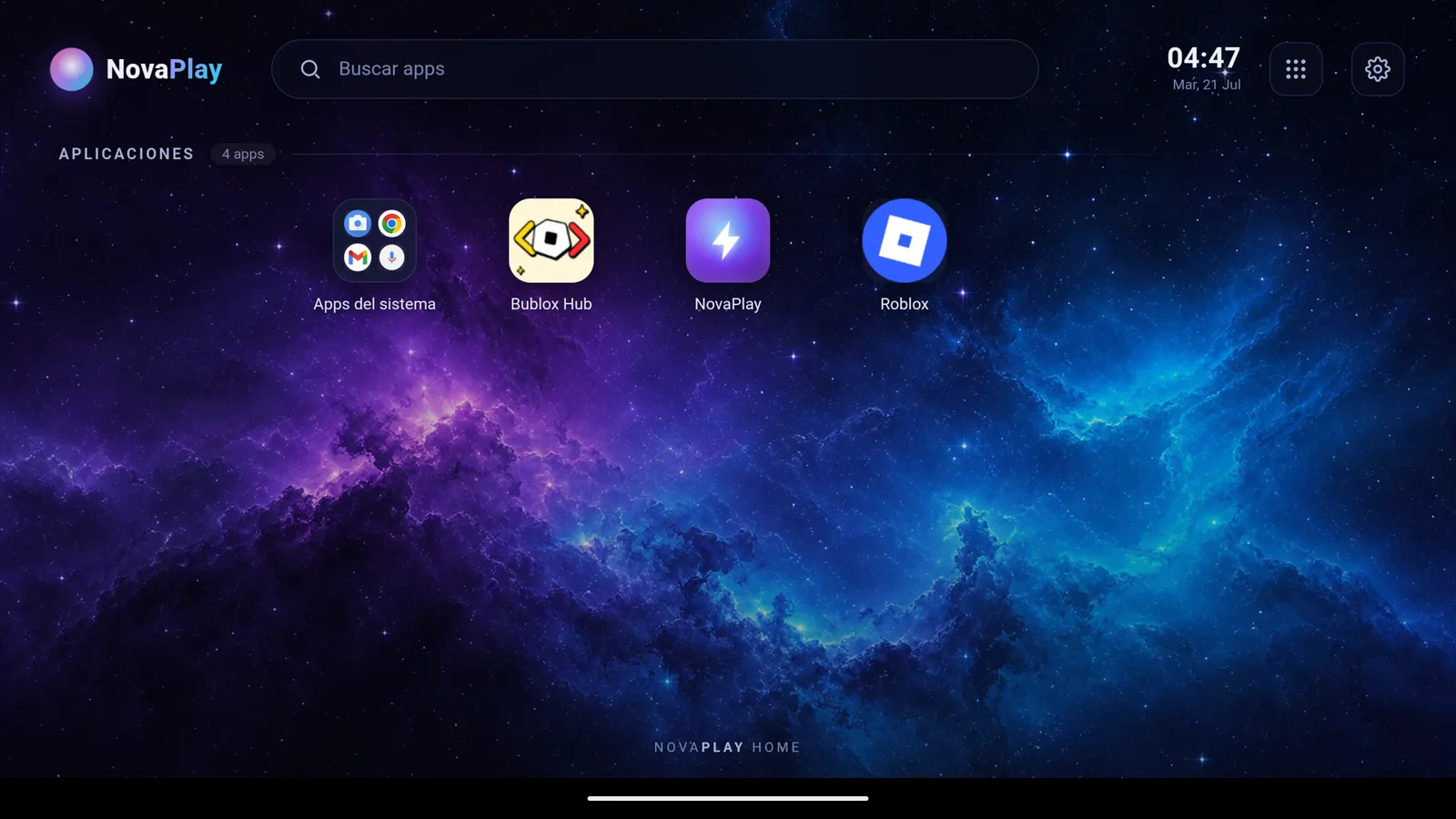
What an Android emulator looks like once it boots: the NovaPlay Home launcher running inside a window on Windows (interface shown in Spanish).
The Difference Between Emulation and Simulation
People use these words interchangeably, but there is a distinction:
- Emulation reproduces the behavior of a target system so that software written for it runs correctly. An Android emulator makes your PC behave like Android hardware.
- Simulation models a system for study or testing and does not need to run the original software.
When you launch a game on an Android emulator, the real APK file is installed and run by Android. Whether the app's code needs any translation depends on the processor it was built for, which the next section covers.
How Does an Android Emulator Work?
Hardware Virtualization
Emulators that run on a regular Windows PC use hardware-assisted virtualization. Intel CPUs have VT-x and AMD CPUs have AMD-V: built-in instructions that let the processor run an isolated virtual machine (VM) without the large slowdown of pure software emulation. Google's Android Emulator acceleration docs list VT-x or AMD-V as a requirement and recommend the Windows Hypervisor Platform (WHPX) on Windows. Intel's older HAXM driver has been deprecated since January 2023, so current emulators no longer depend on it.
Inside that VM, Android boots as a full operating system. The emulator gives it a slice of your RAM and some CPU cores, and Android uses them as if they were dedicated hardware. If virtualization is switched off in your BIOS, most emulators either refuse to start or run very slowly; the guide on how to enable virtualization on Windows walks through turning it on.
The Android Runtime and ARM Translation
Most Android app code is not compiled for a specific processor when you download it. It targets the Android Runtime (ART), which, according to the Android Open Source Project documentation, compiles apps on the device at install time with a tool called dex2oat. Because PC emulators run an x86 build of Android, ART produces x86 code for that part of the app.
Many games, though, also ship native libraries compiled only for ARM, the processor family used in phones. Emulators handle those with an ARM translation layer that converts ARM instructions to x86 while the game runs. That costs some performance, and it is the reason a few games behave differently on an emulator than on a phone.
Graphics Rendering
Android apps draw 3D graphics with OpenGL ES (and, on newer games, Vulkan). The Android developer docs on OpenGL ES list which versions each Android release supports. The emulator can:
- Pass rendering to the host GPU. This is the fastest approach and the one most gaming emulators use. Your NVIDIA, AMD or Intel graphics renders the frames.
- Use software rendering. The CPU does all the graphics work. It is slow and only useful as a fallback.
Many emulators add a translation layer such as ANGLE, which converts OpenGL ES calls to DirectX, or a Vulkan backend. Which one runs best depends on your GPU and drivers, so emulators usually let you switch.
What Are Android Emulators Used For?
Mobile Gaming on PC
This is the most common reason people install one. Games like PUBG Mobile, Call of Duty Mobile, Clash of Clans and Genshin Impact can be played on a large monitor with a keyboard and mouse. Mouse aiming and WASD movement are more precise than a touchscreen in many genres, and a PC can often hold higher frame rates than a phone. The guide on keyboard and mouse controls for mobile games on PC covers key mapping in detail.
App Testing and Development
Android developers use emulators to test apps across screen sizes, Android versions and hardware profiles without owning dozens of devices. Google's emulator, bundled with Android Studio, is built for that job rather than for gaming.
Apps Not Available on Your Platform
Some apps are only released for Android. An emulator lets you install them from the Play Store, or sideload an APK (an Android app package downloaded directly) when the app is distributed that way.
Accessibility
Some people with limited mobility find a mouse, keyboard or adaptive hardware easier to use than a phone touchscreen. Running Android apps on a PC opens up those control options.
Is Using an Android Emulator Legal?
Yes, using an Android emulator is legal in almost every country. The emulator is ordinary software. Android itself is published as open source through the Android Open Source Project, and emulators build on that code or on licensed system images.
Where it gets more complicated:
- Game terms of service: some games forbid emulators in their terms and may ban accounts detected on one. That is a terms-of-service issue, not a legal one, but check before investing hundreds of hours in a game.
- Paid apps: sideloading a paid APK you did not buy is piracy.
- Google Play: the Play Store and Google Play Services are Google's own apps, not part of open-source Android. Emulators that ship them preinstalled do so under their own arrangements with Google's certification rules.
Download a legitimate emulator, play games you have legal access to, and you are on solid ground.
Is an Android Emulator Safe?
The emulator is safe if you download it from its developer's official site. The risks to watch for:
- Unofficial download sites that bundle malware with the installer.
- Random APK sources: sideloading from unknown sites carries the same risk as running any unknown program. Use the Play Store inside the emulator when you can.
- Abandoned emulators: software that has not been updated in years may have unpatched vulnerabilities. Choose one that is actively maintained.
Because Android runs inside a virtual machine, a misbehaving app inside the emulator does not get direct access to your Windows installation.
Emulator vs. Real Phone: Pros and Cons
Advantages of an Emulator
- Larger screen.
- Keyboard and mouse input, more precise for many game genres.
- Higher performance ceiling: a mid-range PC can sustain frame rates many phones cannot.
- No battery drain or overheating phone.
- Multi-instance in emulators that support it: several accounts in separate windows.
- Easy screenshots and recording with built-in tools or the PC software you already use.
Disadvantages of an Emulator
- Setup time: you install, configure and sometimes troubleshoot before you play.
- Gyroscope and multi-touch: games built around tilt or multi-finger gestures only get an approximation.
- App compatibility: some apps check for a real device and refuse to run in an emulator. Banking apps are the usual example.
- Resource use: the VM takes RAM and CPU before your game even loads. If your PC is modest, the best Android emulator for low-end PC guide covers lighter options.
How Do You Pick a Good Android Emulator in 2026?
The differences come down to a few factors:
- Performance: GPU rendering options and steady frame rates matter more than peak numbers.
- Android version: newer versions run some recent apps that older ones cannot, while most popular games still support older releases. Check the minimum Android version listed for the games you care about.
- Keyboard and mouse mapping: a visual key-mapping editor lets you bind keys and mouse movement to on-screen touch controls without extra tools.
- Disk and RAM requirements: official requirements vary a lot between emulators, from about 4 GB of RAM upward.
- Update cadence: an emulator that ships regular updates is more likely to keep up with new games.
For a side-by-side look at current options, see the Android emulator comparison for 2026.
Android emulators: FAQ
Are Android emulators free? Most emulators for playing on PC are free to download and are funded by ads, promoted apps or optional paid tiers. Google's emulator, bundled with Android Studio, is free as well.
Can an Android emulator run iPhone apps? No. iPhone apps are built for iOS, which an Android emulator does not include. Apple's Simulator in Xcode runs only on a Mac and is meant for developers testing their own apps, not for installing apps from the App Store.
Do you need a Google account to use an emulator? Only for Google services. The emulator boots and runs apps without one, and you can install APKs the developer distributes directly. Downloading from the Play Store and cloud saves through Google Play Games require signing in.
Where NovaPlay Fits
NovaPlay is the emulator this site is built around, so here are its specifics rather than general claims. It runs 64-bit Android with ARM translation on Windows 10 and 11 64-bit. The installer is about 15 MB; on first launch it downloads the Android engine (about 2.5 GB), and the full install takes around 9 GB, so plan for roughly 12 GB free. It needs VT-x or AMD-V enabled, at least 4 GB of RAM (8 GB recommended for 3D games) and a DirectX 11 GPU. Google Play Store comes preinstalled, and it includes keyboard and mouse mapping, an FPS limit up to 240 and a choice of renderers. If that matches your PC, you can download NovaPlay.
NovaPlay is an independent Android emulator and is not affiliated with, endorsed by, or associated with any third-party game or brand mentioned. Game names are used for descriptive purposes only.